Close Menu
    Facebook X (Twitter) Instagram
    • Home
    • Privacy Policy
    • Terms of Service
    • About Us
    • Contact Us
    Facebook X (Twitter) Instagram Pinterest Vimeo
    GOSSIP A - Z
    • Home
    • POLITICS
    • News
    • CELEB TRENDS
    • Health
    • Relationship
    • SPORTS
    GOSSIP A - Z
    Home ยป How to Conduct Motor Vehicle Search on NTSA Portal Through eCitizen
    News

    How to Conduct Motor Vehicle Search on NTSA Portal Through eCitizen

    ianBy ianFebruary 7, 2024No Comments2 Mins Read
    Share Facebook Twitter Pinterest LinkedIn Tumblr Email WhatsApp Copy Link
    Follow Us
    Google News Flipboard Threads
    How to Conduct Motor Vehicle Search on NTSA Portal Through eCitizen
    How to Conduct Motor Vehicle Search on NTSA Portal Through eCitizen
    Share
    Facebook Twitter LinkedIn Pinterest Email Copy Link

    How to Conduct Motor Vehicle Search on NTSA Portal Through eCitizen

    Be it a civilian, parastatal, diplomatic, government, or non-government vehicle, all motor vehicles registered in Kenya must have a copy of their record on the National Transport and Safety Authority’s platform.

    This is because NTSA registers all motor vehicles before issuing number plates, with the information stored permanently on their site.

    Even when one changes the ownership of the vehicle, the copy of the record remains the same.

    ALSO READ:

    • Inside Job Exposed: Kenyan Prison Wardens Convicted for Orchestrating Daring Terrorist Escape
    • Uganda Pulls the Plug: Nationwide Internet Blackout Ordered Days Before Crucial General Election
    • African Elections Under the Spotlight as Zambia Turns to Kenya Ahead of 2026 Vote
    • โ€œTwo Drug Barons in Cabinet?โ€ Kenya Government Fires Back as Ex-Deputy President Sparks Explosive Drug Claims
    • Kenyan Court Freezes Use of Private Lawyers by Government, Sparks Nationwide Legal Storm

    At a fee of Ksh 550, one can access a copy of the record search certificate of any vehicle.
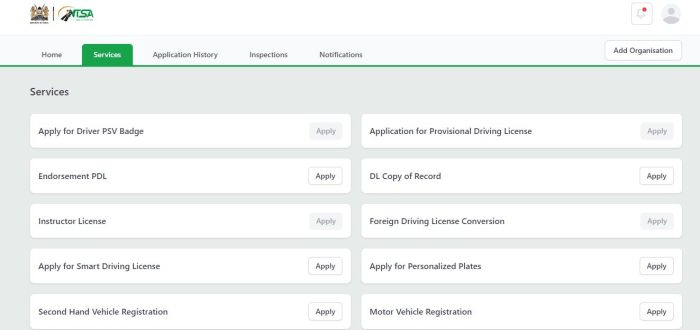
    A screenshot showing the NTSA services on the eCitizen platform.ย 

    However, with the new consolidation of government systems under the eCitizen portal, vehicle search has been moved from the TIMs portal, and checking vehicle records can be done as illustrated below.

    What you need to do:

    First log into the eCitizen account

    Select the New NTSA service portal 

    Go to services, then click on motor vehicle copy of records

    From here enter the registration or chassis number for the vehicle then submit

    Select payment mode and click on complete

    Go to your application history and click on view to download motor vehicle copy of records

    Feedback is immediate.

    What is a copy of the record and what does it entail?

    A copy of the record is a document that contains detailed information on any motor vehicle.

    When one conducts a copy of record search, he might find the chassis and engine number, details of the registered owner, make and model of the motor vehicle, year of manufacture, date of registration, and the caveat status

    How to Conduct Motor Vehicle Search on NTSA Portal Through eCitizen

    E-CITIZEN
    Share. Facebook Twitter Pinterest LinkedIn Tumblr Email WhatsApp Copy Link
    ian
    • Website

    Related Posts

    News

    Inside Job Exposed: Kenyan Prison Wardens Convicted for Orchestrating Daring Terrorist Escape

    January 13, 2026
    News

    โ€œTwo Drug Barons in Cabinet?โ€ Kenya Government Fires Back as Ex-Deputy President Sparks Explosive Drug Claims

    January 13, 2026
    News

    Kenyan Court Freezes Use of Private Lawyers by Government, Sparks Nationwide Legal Storm

    January 13, 2026
    News

    Donald Trump Accused of Rape in Newly Released Epstein Files; DOJ Calls Claims ‘Untrue and Sensationalist’

    December 24, 2025
    News

    Strange Deaths in Nairobiโ€™s Kilimani in 2025 Where Victims Fell Off High-Rise Buildings

    December 24, 2025
    News

    Tragic Night on Kenyan Roads: Former Chief Justiceโ€™s Campaign Team Involved in Accident

    December 24, 2025
    Add A Comment

    Comments are closed.

    © 2026 ThemeSphere. Designed by ThemeSphere.
    • Home
    • Privacy Policy
    • Terms of Service
    • About Us
    • Contact Us

    Type above and press Enter to search. Press Esc to cancel.

    Ad Blocker Enabled!
    Ad Blocker Enabled!
    Our website is made possible by displaying online advertisements to our visitors. Please support us by disabling your Ad Blocker.